Team Roster & Results
Upload meet result CSVs, add swimmers, and review what families will see.
Team Momentum
Races by stroke at each meet, oldest to newest — with the personal bests set along the way.
Add a Meet
Pick the season and drop the results file — CSV/Excel or SwimTopia's .hy3/.sd3/.zip. Type a meet name to label one meet, or leave it blank for a whole-season export. Re-uploading is always safe: matching times merge, new ones are added, nothing duplicates.
Files with age groups (like Top Times exports) auto-add new swimmers to this season's roster. A typed meet name overrides the file's own meet column; a typed date applies to the whole meet — leave either blank to use the file's values.
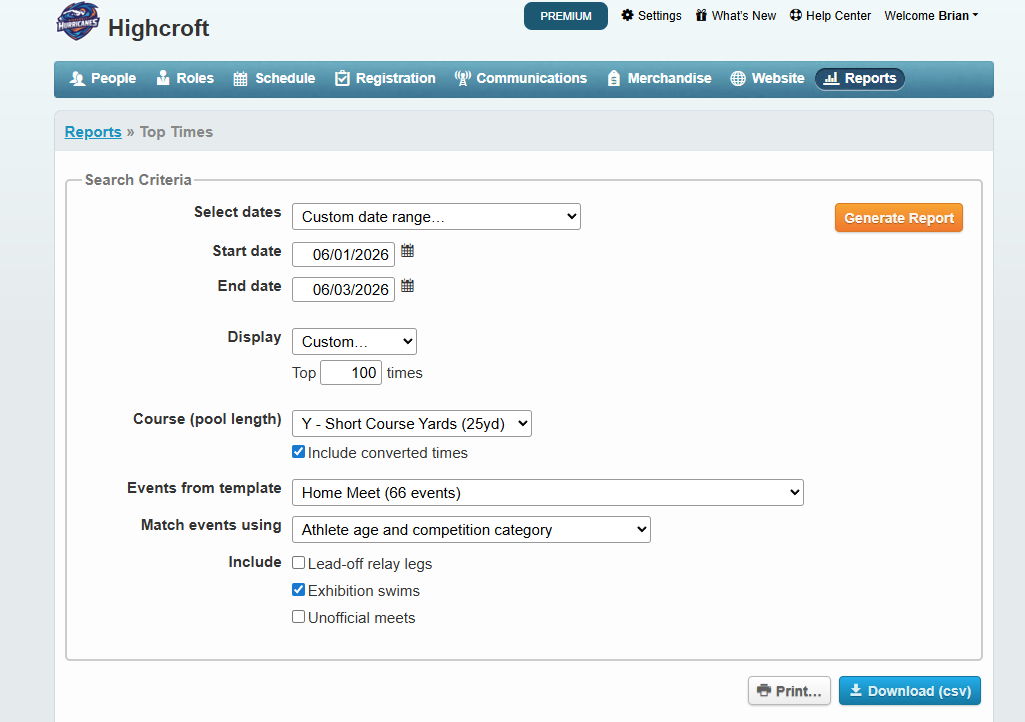
How to get this file from SwimTopia 30-second checklist
- Sign in to the team site → Manage Team → Reports.
- Dates: Custom range, set tight around this meet.
- Display: Custom → Top 100 times · Course
Y — Short Course Yards, 25. - Converted times: include, from the matching Home/Away meet template.
- Match events by athlete age + competition category · include exhibition swims; leave relay lead-offs & unofficial meets unchecked.
- Generate report → Download (csv) and drop it below — or skip all this and drop the
.hy3/.sd3/.zipstraight from Meet Maestro.
Results file formats & columns the importer reads
SwimTopia results files import directly. From Meet Maestro, export the meet results and drop the .hy3 (Hy-Tek) or .sd3 (SDIF) file here — or just drop the whole .zip bundle and the importer pulls the results file out of it. Each swimmer's name, event (distance + stroke), final time, place, and date are read automatically; you still type the meet name above so it reads nicely in stats.
The team's Top Times CSV/Excel export also drops in directly — its columns (age_group, distance, stroke, place, converted_time/original_time, last_name, first_name, age, date, swim_meet) are all recognized. Course-code suffixes on times (18.06Y, 1:00.42Y) are handled automatically, and the gender + age bracket are read from the age_group label (e.g. "Girls 6 & Under").
At minimum the importer needs a name (first_name + last_name, or a single Athlete column in "Last, First" form), a stroke (or Event), and a time. The meet name and date you type above win over the file's own swim_meet/date columns, so one upload becomes one named meet. Older exports (Athlete,Event,Time,…) still work too.
Stroke-only files work too: if a file just lists the Stroke (Freestyle, Backstroke, …) and a Time with no distance, the distance is filled in from each swimmer's age group automatically — 6 & Under 15y, 7-8 and 9-10 25y, 11-12 and older 50y — so the time lands on the right event and leaderboard.
age_group,distance,stroke,place,converted_time,converted_hundredths,original_time,last_name,first_name,age,team_abbr,team_name,date,swim_meet
Girls 6 & Under,15,Freestyle,1,18.06Y,1806,18.06Y,Purcell,Rylee,6,HHST,Highcroft Hurricanes Swim Team,06/02/26,Practice Meet vs. The Reserve
Boys 13-14,50,Freestyle,3,32.18Y,3218,32.18Y,Coleman,Reid,14,HHST,Highcroft Hurricanes Swim Team,06/02/26,Practice Meet vs. The Reserve
Boys 11-12,50,Freestyle,7,1:00.74Y,6074,1:00.74Y,Roman,Luke,11,HHST,Highcroft Hurricanes Swim Team,06/02/26,Practice Meet vs. The Reserve
Add Relay Results
Drop the team's Top Relay Times export (CSV). It's a whole-season report — every row already carries its own meet and date, so there's nothing else to type except the season. Re-uploading is always safe: matching relays merge, new ones are added, nothing duplicates.
Columns the relay importer reads
Columns age_group, place, converted_time/original_time, relay_names, team, distance, stroke, date, and swim_meet are all recognized — the same aliases the meet-results importer uses. relay_names should look like A: Larken Kelliher, Boston Buehler, Tyler Eklund, Isaac Salvitti (squad letter, colon, then all 4 legs in swim order); each name is matched to a swimmer using the exact same name-matching the roster uses, so it should read from the roster spelling.
age_group,place,converted_time,relay_names,team,distance,stroke,date,swim_meet
Boys 11-12,1,2:11.10Y,"A: Larken Kelliher, Boston Buehler, Tyler Eklund, Isaac Salvitti",Highcroft Hurricanes Swim Team,200,Freestyle Relay,6/9/2026,2026 Weldon Ridge at Highcroft
Uploaded Files
Every roster and meet file you've uploaded, grouped by season — including re-uploads, which are listed under the meet they merged into. Click the trash icon to remove a file: its swimmers stay, but the times (or roster spots) it added are taken back out, and stats recompute.
Add a Time Manually
Search for a swimmer and log a single race time. It saves to Firebase and shows up on their profile, the season leaderboards, and the awards boards — exactly like a time from an uploaded meet file.
Add or Update Swimmer Manually
Use this when you need to register a swimmer before their first meet, or fix a parent name / email. "Last, First" names are auto-flipped.
Upload Roster
Drop your Swimtopia roster export here — CSV or Excel (.xlsx, .xls). Recognized columns include
Athlete First Name, Athlete Last Name,
Parent 1 Email / Account Email,
Account Name (parent), Group Name, and Date of Birth (used to compute age).
You can drop multiple files at once. No times are required.
Every swimmer on this roster will be marked as "on the team" for the season you pick. When you later upload meet times for the same season, only those swimmers will match — old swimmers from previous seasons stay safely in the database for their own season's records.
Roster CSV columns the importer recognizes
Athlete First Name,Athlete Last Name,Date of Birth,Group Name,Account Name,Parent 1 Email,Parent 2 Email,Address
Riley,Carter,2014-08-12,Bronze,Jordan Carter,jordan@example.com,morgan@example.com,415 Coastline Drive
Mateo,Rivera,2015-02-04,Silver,Sofia Rivera,sofia@example.com,,82 Pine Ridge Lane
Ava,Thompson,2013-11-30,Gold,Marcus Thompson,marcus@example.com,,127 Lakeshore Court
Importing from Swimtopia Tap for step-by-step guide
Two files flow into this site: a roster (who's on the team, with parent emails) and meet results (the times). Drop them as CSV or Excel (.xlsx / .xls) — multiple at once is fine. The importer auto-detects Swimtopia's column names — including "Athlete Last Name / Athlete First Name" and the "Last, First" name format used in result reports.
Roster export (do this first)
-
1
Sign in to Swimtopia
Go to swimtopia.com (or your team's .swimtopia.com subdomain) and sign in with your coach / admin account.
-
2
Open Athletes → Export
From the team dashboard, go to People → Athletes (or Roster). Click the Export / Download button and pick CSV.
-
3
Include parent contact columns
Make sure the export includes
Athlete First Name,Athlete Last Name,Group,Date of Birth,Account Name(parent), and at least one email column (Parent 1 Email/Account Email). These power the family lookup. -
4
Drop it in the Roster zone below
Use the Upload Roster card. Every swimmer, parent, group, and email is saved to Firebase. No times are added by this step.
Meet results export (after each meet)
-
1
Open the meet → Results → Reports
On the meet page, click Results, then Reports. Choose Individual Results or Athlete Results (one row per swimmer per event).
Don't use the "Top Times" export for a meet. A Top Times report only lists each swimmer's best legal time per event, so it silently drops every DQ swim (a disqualified swimmer earned no "time") and every relay leg — which is exactly why a meet can come in a few races (and a swimmer or two) short. The Individual Results report, or the raw results file straight from Meet Maestro (
.hy3/.sd3/.zip), includes every swim — so use one of those to capture everyone who raced. -
2
Export as CSV
Click Export → CSV (.csv). Swimtopia results usually use the
Athletecolumn in "Last, First" format — that's fine, the importer flips it for you. -
3
Drop it in the Meet Results zone below
Times merge into the roster you already uploaded. Matching swimmers gain new races; nothing is overwritten.
Tips for the cleanest import
- Upload the roster first, then meet results. That way the email/parent info is on file before times start landing.
- CSV and Excel both work — drop
.csv,.xlsx, or.xlsstraight from Swimtopia. Excel workbooks with multiple sheets are merged. - Drop multiple files at once. Whole season's worth of meets? Select them all — each is processed and the totals are aggregated.
- Times upload auto-cleans the roster. After importing meet times, any swimmer no longer on the roster is removed automatically (so old kids don't linger on leaderboards). Always re-upload the latest roster first if folks have left the team.
- The importer understands Swimtopia's column names —
Athlete First Name,Athlete Last Name,Account Name,Parent 1 Email,Group Name,Date of Birth, etc. No renaming needed. - Names in "Last, First" format are auto-flipped. "Carter, Riley" becomes "Riley Carter" automatically — Swimtopia's results reports use that format.
- Multiple email columns are all kept (e.g.
Parent 1 Email+Parent 2 Email) — families can look up the swimmer using any of them. - Keep swimmer names consistent across meets so results stack on one swimmer card.
- Times can be
SS.HH(28.42) orM:SS.HH(1:02.18). Both formats work. - Re-uploading the same file is safe — matching rows merge, new ones append.
- DQ swims are counted as races. A disqualified swim shows on the swimmer's card as
DQand counts toward "races logged" (so every racer is captured), but it has no time, so it never appears on a leaderboard, Fastest Five, or a personal-best — exactly where a DQ belongs. No-shows and scratches are still skipped (they didn't race). This only works if your file actually contains the DQ swims — see the "Top Times" warning above.
Clean up duplicate times
If a meet got uploaded more than once, swimmers can end up with the same race logged several times. Pick that meet to keep only the fastest time per event (so a swimmer who raced two distances of one stroke keeps both). Preview first — nothing changes until you apply.
Clear a season's meets
Remove every meet time from a single season in one go — useful to start a season's results over. The roster, time trials, and all other seasons are untouched, and every removed time is saved to the Time Edit History below, so you can restore it any time.
Time Edit History
Every time added by hand and every batch of times removed (by deleting a file or clearing a season) is logged here — even after the file is gone. Click Restore to put a removed time back on the swimmer's profile.
Roster
Click Edit next to any swimmer to manage their emails, parents, age, or group. Families look up their swimmer using the swimmer's name + an email on this list.
Data management Sample CSV · Clear data · Reset
Utilities for testing and emergency resets. Clear actions can't be undone — they wipe the matching Firestore collections immediately.